🛰️ ResumeRadar — Catch Resumed Halts Without Refreshing Nasdaq
ResumeRadar is a lightweight desktop tool that automatically detects trading halts and launches timers with alerts to help you react fast when the stock resumes trading. Whether you're watching IPOs, halt waves, or ticker volatility, ResumeRadar keeps you focused where it counts.
🔎 Quick Navigation
⚡ Core Features 🖼️ App Preview 📥 Join the Waitlist 🧪 Free vs Paid Versions 🎯 Who It's Built For 🪄 Downloads 🖥 System Requirements 🖥 Instructions For Use 📬 Support & Feedback⚡ Core Features
- Auto-detect active trading halts in real time
- Countdown timers (5, 10, or 30 minutes)
- Optional auto-refresh every 30s
- Filters by price range and halt duration
- Fallback mode shows 5s countdowns during quiet sessions
- No installation — just run the EXE
- Session and crash logs written locally
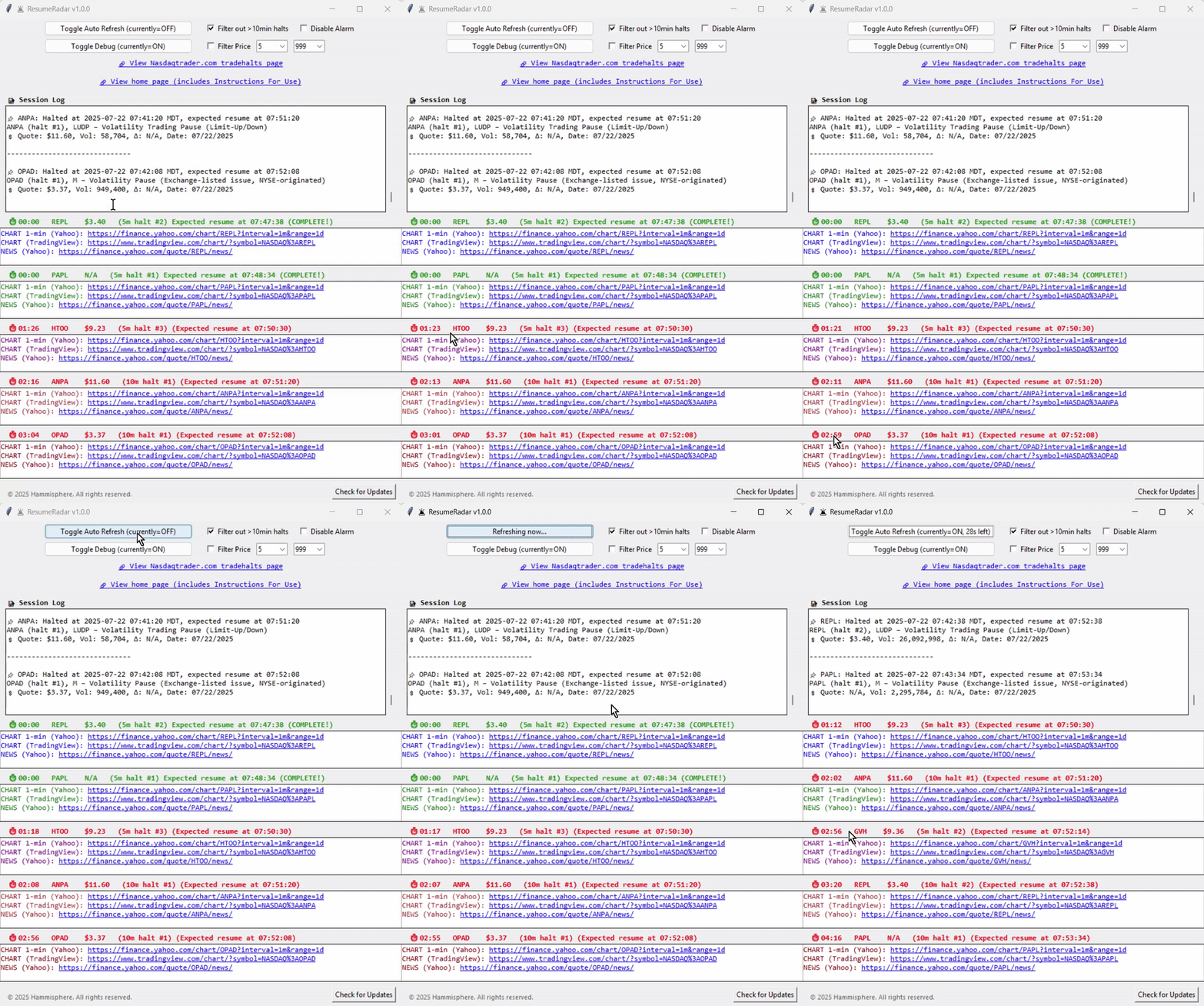
🖼️ App Preview
Here's a quick look at ResumeRadar in action:
🧪 Free vs Paid Versions
| Feature | Free Version | Paid Version |
|---|---|---|
| Halt Detection | ✅ | ✅ |
| Countdown Boxes | ✅ (1 timer only) | ✅ (up to 5 simultaneous) |
| Price/Duration Filtering | 🚫 | ✅ |
| Auto-Refresh | 🚫 | ✅ |
| Crash Logging & Fallback | 🚫 | ✅ |
| Multiple Timers | 🚫 | ✅ |
| Documentation Included | ✅ (ReadMe only) | ✅ (ReadMe + changelog) |
🎯 Who It's Built For
- Traders reacting to IPO resumes or halt wave volatility
- Users tired of refreshing Nasdaq halt pages manually
- Anyone using overlays, scanners, or bots looking for a halt add-on
- Windows users who prefer plug-and-play utilities without setup hassles
📥 Join the Waitlist
Want to hear about new ResumeRadar features and releases first?
🪄 Downloads
🖥 System Requirements
- Windows 10 or 11 (64-bit)
- Internet connection for live halt detection
- No Python installation required — bundled EXE
- Mac/Linux not currently supported
📘 Instructions for Use & Safety Notice
- Double-click
ResumeRadar.exeto launch — no installation required. - On startup, ResumeRadar checks for active halts. If found, up to five countdown boxes will appear.
- Each countdown duration is estimated based on time elapsed since halt began:
- 0–5 minutes → assumed 5-minute halt
- 5–10 minutes → assumed 10-minute halt
- 10+ minutes → assumed 30-minute halt
- If no active halts are detected, ResumeRadar enters debug mode, showing simulated countdowns based on the most recently resumed halts.
- Use the Toggle Debug Mode button to disable simulated timers if preferred.
- Use the Filter out >10min halts checkbox to exclude longer halts from being tracked.
- Use the Toggle Auto Refresh button to enable 30-second refreshes for live halt data.
- Use the Disable Alarm checkbox to mute the alert sound when a timer completes.
- Adjust filters (max price, halt duration) to control which resumptions trigger countdown boxes.
- Click the NasdaqTrader link to open the live halt feed used by the app.
- Click the Home Page link to view screenshots, feature breakdown, and instructions.
- Use the Check for Updates button to compare your version to the latest release and get update instructions.
- Session details are logged to
halt_monitor.logand crash logs tohalt_monitor_crash.log— stored in your Documents folder or fallback locations. - ResumeRadar is digitally signed using Microsoft’s signtool to verify integrity and authorship. Windows SmartScreen may show a warning due to the app’s newness — this is expected and safe to bypass if you trust the source.
📬 Support & Feedback
If you’ve got questions, suggestions, or bug reports, drop a note:
Email: hammisphere@gmail.com
🛡️ Disclaimer
ResumeRadar is an independent utility built for informational and workflow purposes only. It uses publicly available trading halt and quote data sourced from NasdaqTrader.com and financial quote data accessed via Yahoo Finance through the open-source yfinance Python library. ResumeRadar does not redistribute, modify, or represent this data as proprietary.
This tool is not affiliated with, endorsed by, or certified by Nasdaq, Yahoo, any financial institution, or regulatory body. Users are responsible for verifying all trading decisions independently. ResumeRadar does not offer investment advice and makes no guarantees regarding market behavior, data accuracy, or real-time availability.